Get a heads-up before accidentally leaving a video call, so you never lose your place in an important conversation.
Mass alert previews now display your message exactly as it will be sent, with proper formatting and line breaks. No more surprises when alerts go out.
Video call controls now tuck away automatically when not in use, giving you a cleaner, distraction-free view during meetings.
Confirming a mass alert is now clearer and more reassuring, reducing the risk of sending errors during high-pressure moments.
Sign up and subscribe directly online. Get your crisis management environment up and running in minutes, with secure payment built in.
Fixed an issue that could cause an error when deleting storage containers.
September 8th, 2026
Write a comment...
August 27th, 2026
Storage container search
Search your whole document library. Search now finds files and folders anywhere in your library, not just inside the folder you have open
Navigate long crisis playbooks
A table of contents lets you jump between sections, and the save button follows you as you scroll instead of sitting at the bottom of the page.
Better scrolling on small screens
Smoother invitations and sign-up
Instant pinning in the logbook
More reliable sessions
Security updates
Write a comment...
August 13th, 2026
Bulk-import stimulus templates from a CSV file when setting up a simulation
Your assigned role now appears when you switch between tenants
Clearer error messages, now shown by default in your language
Smoother mobile experience in the Simulation Control Center and Logbook, with footer options always reachable
Platform stability, security, and performance improvements
A new sign-up flow
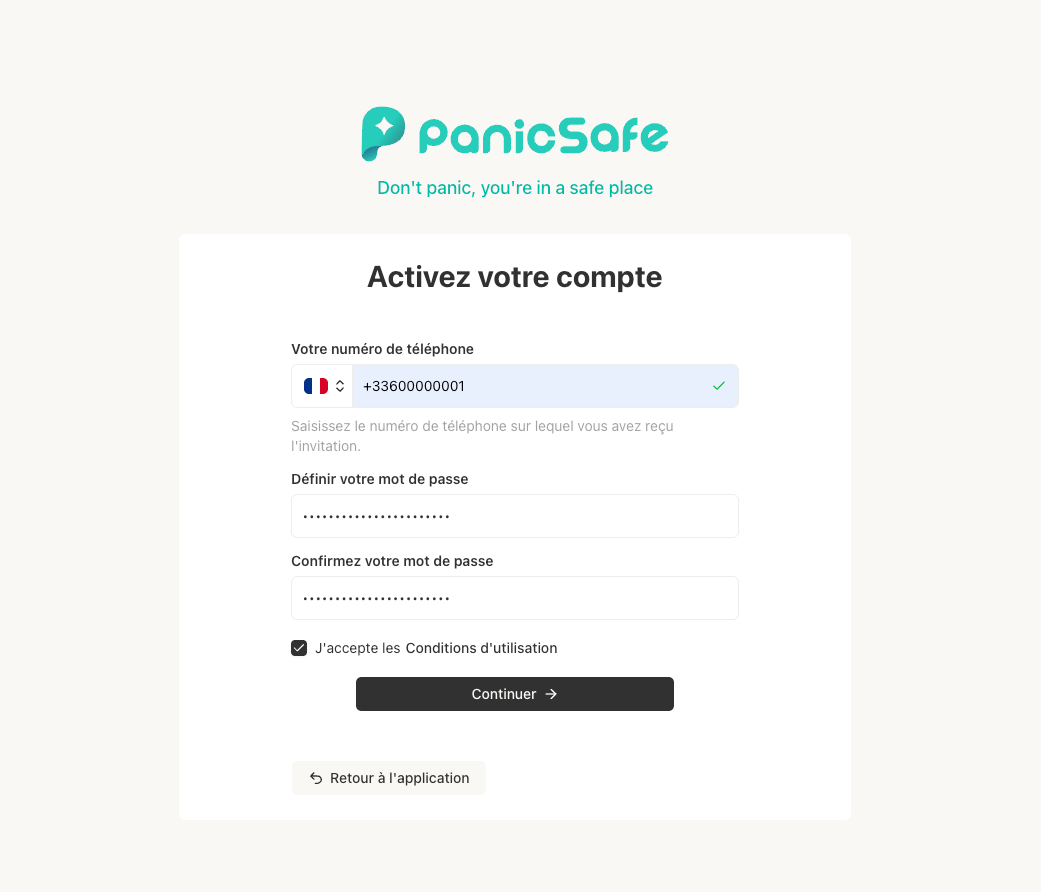
Activating your account is now simpler. When you're invited to join a tenant, you'll receive an invitation by SMS.
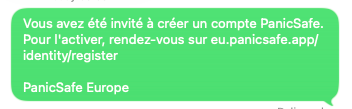
To get started, go to https://eu.panicsafe.app/identity/register and enter the phone number where you received the invitation. Set a password, accept the terms of use, and click Continue.
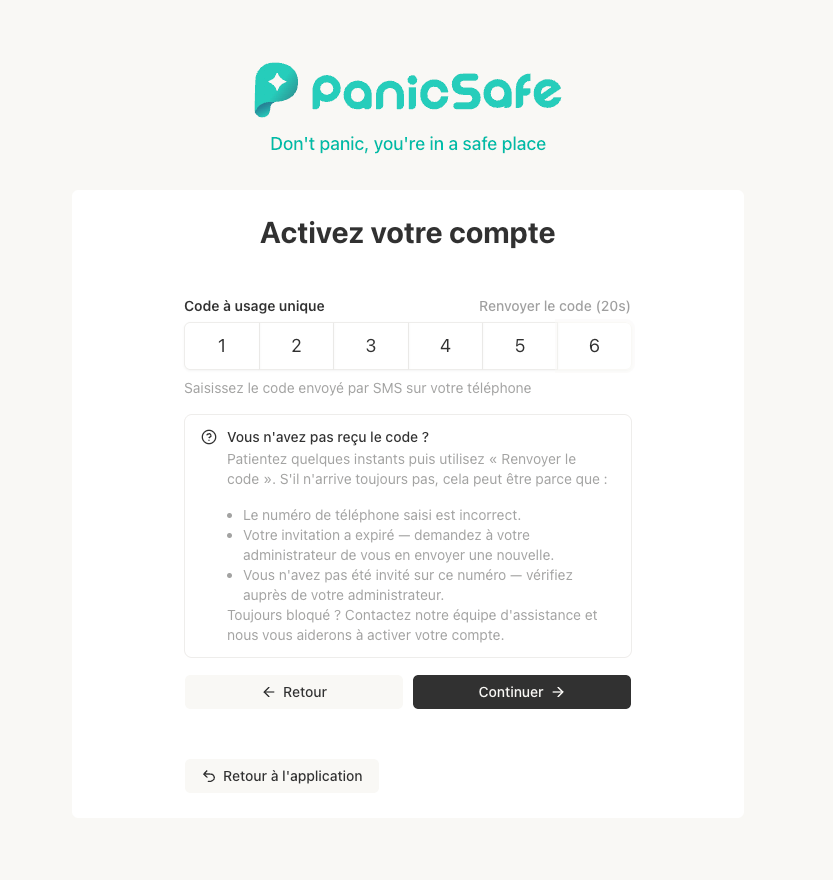
If your invitation is valid, a 6-digit code will be sent to your phone. Enter it to verify your number, then click Continue. You'll be signed in and ready to go.
If something goes wrong: Use the "Forgot password" flow to reset the registration process and start again from the beginning. Note that sign-up requests are rate-limited, so if you've made several attempts in a row, wait a little before trying again.
Write a comment...
July 28th, 2026
Organizational Mapping with Entities
Organize your assets logically by business units, plants, branches, or subsidiaries. This creates a clear ownership chain from your entire organization down to individual assets, making it easier to manage complex structures.Advanced Impact Tracking
Move beyond simple financial loss tracking. You can now monitor impacts using capacity-based metrics that matter to your specific industry, such as liters, kilograms, kWh, or persons.Real-Time Impact Dashboard
Monitor your crisis response through a new grid-based dashboard. This allows you to view the operational status of all assets at a glance, grouped by entity, with clear indicators of resolution progress.Flexible Asset Management
Streamline your preparation with easy CSV imports and hierarchical modeling. During an active crisis, you can now create new assets on-the-fly to ensure your tracking remains accurate in real-time.Faster Information Access
We have optimized how data is loaded, ensuring that your room pages and event histories remain fast and responsive, even when managing large volumes of information.Precision Time Management
New timezone indicators in your reports ensure that all timestamps and schedules are perfectly synchronized with your local time, providing clarity for teams working across different regions.Improved Business Hours Configuration
We have refined the business hours settings to be more intuitive, with clearer labels and a more user-friendly layout to help you define your operational windows accurately.
Write a comment...
July 16th, 2026
New Folder Management: You can now organize your files, reports, and documents into a structured folder tree. Easily create, move, rename, and delete folders to keep your storage organized and easy to navigate.
Enhanced Chat Visibility: SARA messages now feature distinct, making it easier to visually distinguish between user messages and AI responses.
Improved Accuracy & Reliability:
Added a timezone preview in settings to verify time configurations before saving.
Improved validation for fields on entity pages to ensure smoother data entry.
Developer Experience: Improved accessibility to API documentation via integrated Swagger UI and direct links within the API tokens page.
Write a comment...
June 30th, 2026
Improved logbook accuracy and interface refinements
Enhanced logbook by allowing users to backdate entries, ensuring accurate timelines when transcribing notes taken during a crisis
Streamlined the password reset process for a more seamless and secure account recovery experience
Refined the mass alert template interface for improved visual clarity and easier tag management
Corrected room card badges to provide accurate and immediate visibility into room statuses
Optimized the user interface for smaller screens to ensure all elements remain fully accessible
Implemented backend optimizations to enhance platform stability, security, and data integrity
Write a comment...
June 16th, 2026
This release focuses on enhancing the user interface, improving the reliability of mass communications, and streamlining logbook workflows:
Modernized User Experience: Introduced a refreshed authentication interface and improved app accessibility with new prompts for seamless PWA installation and automatic version updates.
Enhanced Mass Alert Reliability: Added anti-spam detection for SMS alerts to prevent delivery issues caused by URLs and optimized templates to prevent unexpected SMS credit consumption.
Streamlined Logbook & Task Management: Improved traceability accuracy by automatically including author information when converting chat messages to logbook entries and fixed issues with job and dependency selections.
Improved Interface Usability: Refined navigation with better dropdown positioning, an intuitive new timezone selection tool, and the ability to paste images directly into the platform for faster information sharing.
Reliable Communication: Resolved bugs in the delivery and display of crisis training stimuli to ensure accurate and clear reception.
These updates provide a more polished, reliable, and efficient environment for managing high-stakes operations.
Write a comment...
June 2nd, 2026
Enhanced self-task management
Resolved an issue preventing the duplication of playbooks
Allow users with pending invitations to be added to rooms
Corrected a display error regarding group availability to provide accurate visibility into team readiness
Refined several visual elements, including mass alert cards and layout spacing, for a more polished user experience
Write a comment...
May 19th, 2026
This release introduces a more intuitive way to model your organization and a refreshed visual experience to help you manage crises with greater ease.
Intuitive Organizational Modeling
We are evolving how you represent your organization. By transitioning from "Risk Profiles" to "Entities," it is now easier to organize your real-world groupings, such as companies, business units, plants, or branches. This change lays the foundation for a more powerful way to manage assets and track their impact during a crisis.A Refreshed Visual Experience
Enjoy a more modern look and feel. We have updated our application icons and refined all core interactive elements, including menus, selection tools, and input forms. These updates ensure that navigating the platform is smoother and more intuitive.Enhanced Platform Reliability
We have implemented significant underlying improvements to ensure the platform remains fast, secure, and highly stable. We have also resolved several minor visual bugs and fixed issues with progress tracking to provide a more seamless workflow.
These updates provide a more polished user experience and a more scalable foundation for managing your organization's most critical assets and crisis response plans.
Write a comment...
May 11th, 2026
This release focuses on improving job management capabilities and enhancing platform security:
Enhanced playbook configuration with auto-assignment capabilities
Improved job step comment formatting and rendering
Fixed rendering issues with the "Convert to Playbook" button
Improved error handling
Improved 2FA configuration handling
Fixed mobile view issues
These updates help your team manage crisis response more effectively while maintaining a secure and reliable platform. The enhanced job management features and security improvements will support your organization's critical operations.
Write a comment...